Imagine this scenario: You’ve spent weeks perfecting a Pine Script strategy. It works. The backtests look solid. But now you face a challenge: How do you find the tickers that match your conditions right now?
For years, traders have waited for one feature: The TradingView Pine Screener. A tool that allows you to screen tickers based on your custom logic, not just standard indicators.
Recently, TradingView introduced this feature. However, it comes with specific requirements. The official TradingView Pine Screener is often tied to recurring Premium subscriptions. Plus, configuring it for highly specific custom strategies—like comparing the current bar to previous bars to find a “state change”—can be restrictive.
There is a smarter way.
In this guide, I will show you a powerful alternative to the TradingView Pine Screener. It gives you the capability to scan your watchlist with your own complex logic—but with full control and without recurring monthly fees.
Let’s automate your workflow.
The Limitations of the Official TradingView Pine Screener
Most traders start by looking for the built-in TradingView Pine Screener feature. While powerful for many use cases, it has structural limitations that can affect serious traders:
- Subscription Model: Advanced screening features are often restricted to higher-tier plans.
- Static Scanning: Most standard screeners check the current state (e.g., “RSI > 70”). They can struggle to detect the exact moment a condition flips (e.g., “RSI was < 70 yesterday, but is > 70 today”).
- Cloud Execution: You rely entirely on the platform’s cloud environment, which can be a “black box” for your custom logic.
You need a solution that works directly on your chart, follows your exact rules, and belongs to you.
The Technical Challenge: Why Custom Screening is Hard
Technically, you can try to build your own TradingView Pine Screener using the request.security function. This command allows an indicator to request data from other tickers.
But building a robust scanner yourself is difficult:
- Detecting “Flips”: Writing logic that accurately compares the current bar to prior bars across hundreds of tickers to find fresh signals requires complex state management.
- Data Handling: Managing arrays and data requests for large watchlists without lagging your chart is a major technical hurdle.
- Context: A raw signal isn’t enough. You often need to cross-reference it with the broader Trend or Analyst Consensus, which adds another layer of coding complexity.
Most traders stop here and return to manually clicking through charts.
The Solution: The ChartAnchor Custom Screener
We realized that traders need a reliable TradingView Pine Screener alternative that puts them in full control. That’s why we built the ChartAnchor Custom Screener.
It is a pre-built, professional Pine Script framework that acts as a container for your logic. Unlike the standard TradingView Pine Screener, this tool runs directly on your chart as an indicator overlay.
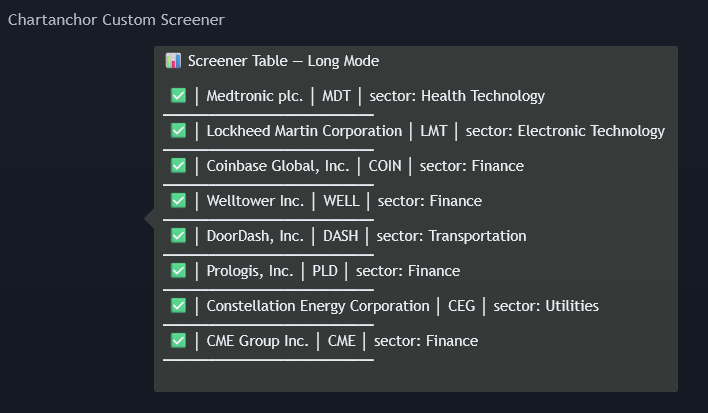
How it works: You simply paste your specific Buy or Sell conditions (e.g., rsi < 30 and close > ema200) into our template. The screener instantly checks your watchlist. Instead of a complex dashboard with empty cells, it generates a clean, readable text list directly on your chart.
- If a ticker fits your rules: It appears on the list with a ✅ checkmark.
- If it doesn’t fit: It stays hidden to keep your view clean.
Key Advantages over the Official Pine Screener
- Unlimited Scaling (Multi-Script): Each script instance handles a watchlist of up to 320 tickers (organized in sets). Need to scan the entire S&P 500? Simply apply the script a second time with a new list. Since you own the code, there are no artificial limits.
- Flip Mode vs. Static Mode:
- Static Mode: Shows tickers that currently meet your condition.
- Flip Mode: Shows tickers that just changed state (e.g., condition is TRUE now, but was FALSE on the previous bar). This ensures you catch the move when it starts.
- Contextual Filters: Automatically overlay Trend filters (SMA/EMA) or Analyst Consensus ratings to filter out low-quality signals before they even hit your list.
- Lifetime Access: No recurring monthly fees for the tool itself. You own the code.
Real-World Use Cases: The Alternative in Action
Here is what you can do with this alternative to the TradingView Pine Screener:
Use Case 1: The “Fresh” Trend Pullback
- The Goal: Find stocks that just dipped into a buy zone.
- The Logic:
Price > SMA 200(Trend) ANDRSI < 30(Dip). - The Advantage: Using Flip Mode, the screener alerts you only when the RSI crosses into the oversold territory this bar. You don’t see stocks that have been oversold for weeks.
Use Case 2: The Confirmed Breakout
- The Goal: Catch volatility expansion backed by analysts.
- The Logic:
Bollinger Band Widthexpands ANDVolumespikes. - The Filter: You enable the built-in Analyst Filter to show only tickers with a “Strong Buy” rating.
- The Result: You get a shortlist of high-conviction breakouts instantly.
How to Set It Up (In 3 Simple Steps)
Setting up your custom scanner takes less than 5 minutes.
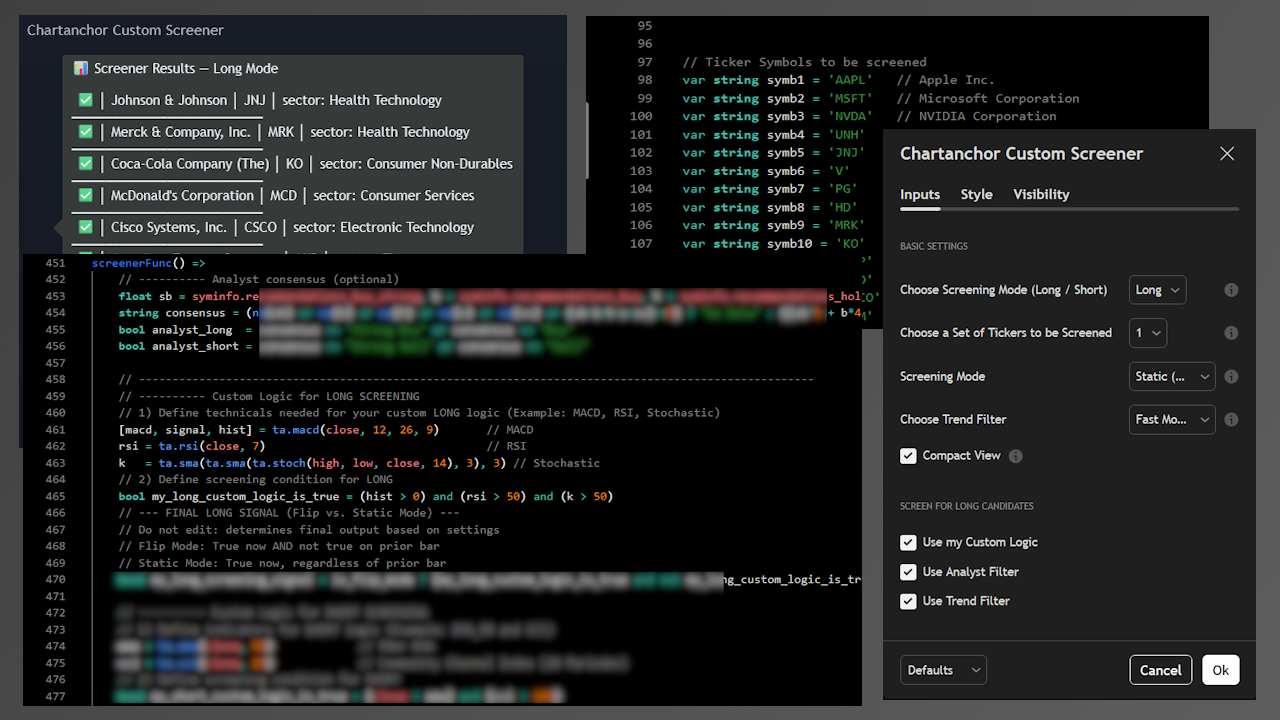
- Load the Script: Add the ChartAnchor Custom Screener to your chart.
- Define Your Watchlist: Edit the ticker list in the code (template included). You can add up to 320 symbols.
- Connect Your Logic: Copy your strategy’s condition into the input field and choose between Static or Flip Mode.
Conclusion: Stop Searching, Start Trading
In trading, your mental energy is your most valuable resource. Avoid fighting with limitations or paying recurring fees for features you can own.
The ChartAnchor Custom Screener is the robust, cost-effective alternative designed for traders who want full control.
Ready to upgrade your workflow?